Configurable Retention Periods
Manage how long chats and projects are retained before they're automatically deleted due to inactivity

Configurable Retention Periods in Noxtua give organizations clear visibility into how long their chats and projects are retained after inactivity and the flexibility to choose a retention period (30/90/180 days) that better suits their needs.
What are Configurable Retention Periods?
Configurable Retention Periods determine how long Noxtua retains your chats and projects before automatically deleting them. Deletion is based on inactivity. Each time you work in a chat, its countdown resets, so only content inactive for the full period is removed. When the period expires, the entire project is deleted. Please note: Deletion applies only to chats and projects created after you turn on the respective toggle. Old chats and projects won’t be affected.
Administrators manage retention in Organization Settings. What you find there depends on how your organization is set up. Some organizations use a fixed 8-hour retention period, and others can configure their own.
Temporary Mode
If your organization is already set to 8-hour retention, you see a single Temporary Mode toggle, on by default. While it is on, chats and projects created after the setting should be deleted after 8 hours of inactivity. Turning it off keeps chats and projects indefinitely. Turning it back on restores deletion after 8 hours of inactivity. This setup does not have a period to select.

Auto-delete
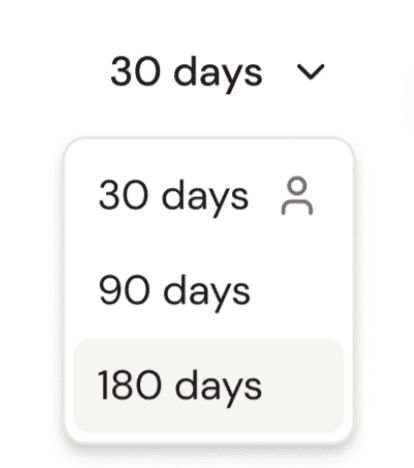
If your organization isn't already set to 8-hour retention, you'll see an Auto-delete toggle (off by default) and a dropdown of retention periods: 30, 90, or 180 days. Selecting a period is the first step: pick a value, then turn the toggle on to activate it.
How to set or change your retention period
Open Organization Settings. You will find the Auto-delete toggle and the period dropdown.
Select a retention period. Choose 30, 90, or 180 days from the dropdown. You must select a period before you can activate auto-delete.
Turn on Auto-delete. With a period selected, switch the toggle on. From now on, new chats and projects that you’ll create will be deleted after the selected inactivity period.
Change the period later. To switch to a different period, turn Auto-delete off, select the new value, then turn it back on. The period remains fixed while auto-delete is active, so any change always goes through the toggle.
Good to know
Each update is confirmed with a brief message such as "kept indefinitely," "fixed at 8 hours," or "active based on the selected time period," making the current setting clear.
The countdown is based on inactivity. Any new activity in a chat resets the countdown, and content is removed only after the chat has been inactive for the full period. When that happens, the entire chat or project is deleted.
If a new chat is added to an existing project, it follows the project's retention setting; it does not adopt any policy activated or changed afterward.

Lina Hauschild