Document citations
Review documents with AI answers linked directly to source passages
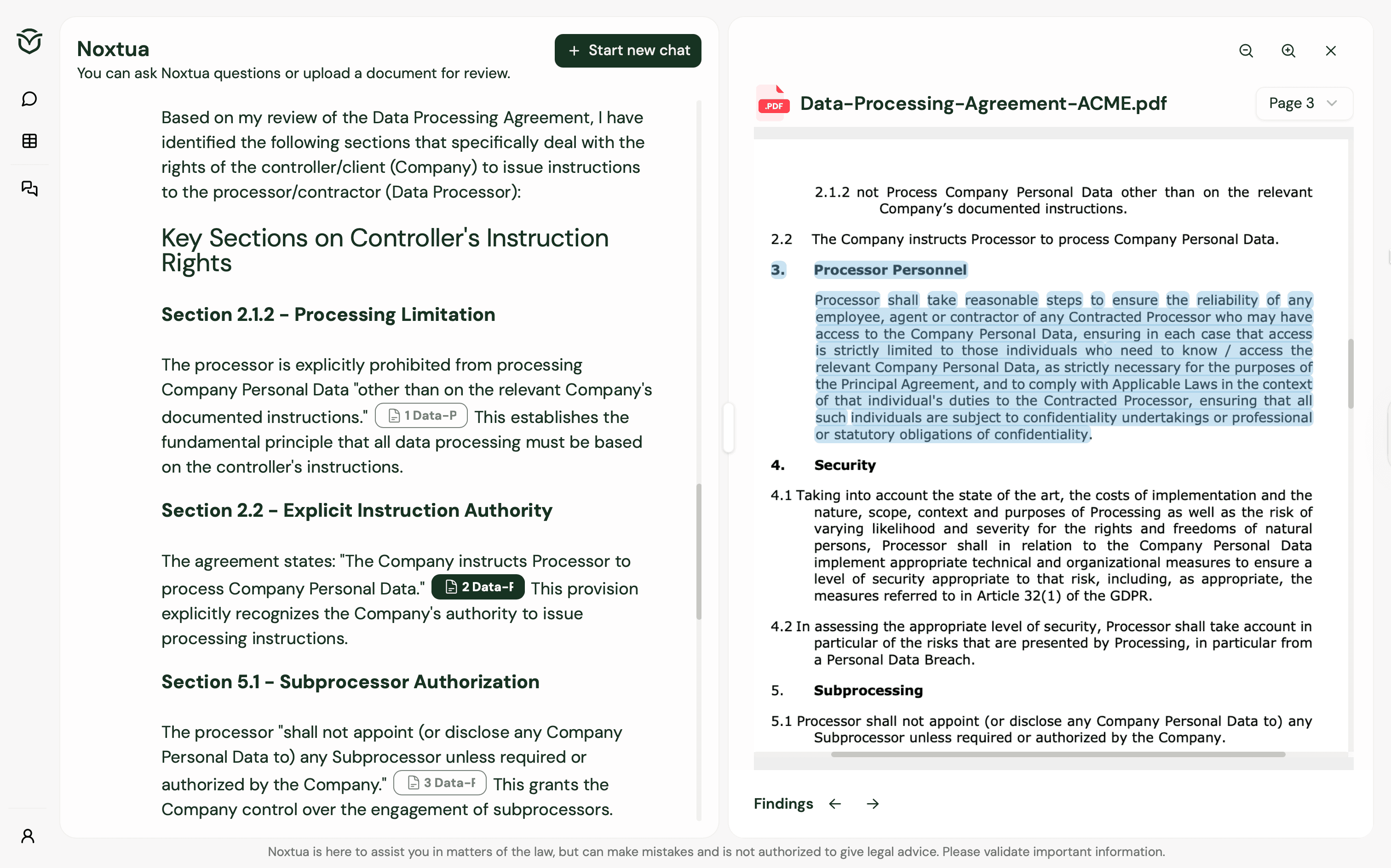
When reviewing legal documents with AI, verifying the generated answer against the original source is essential. But instead of switching back and forth between the AI answer and the document, Noxtua provides citations from the original document to streamline your work.
What are document citations?
When you upload a document and ask Noxtua to review it, the system analyzes your file and generates an answer with direct citations from the original document. Click any citation to open the document in side-by-side mode next to the chat, with the exact text passage highlighted for quick verification.
How to use document citations
Upload a PDF or Word file into the chat interface.
Enter your prompt asking Noxtua to review, summarize, or extract information from the document.
Review the answer and citations that Noxtua generated.
Click any citation to open the document with the exact passage highlighted.
Typical use cases
Review documents, passages, or clauses
Example: "Check if the fixed-term clause in this employment contract is legally valid."
Extract information from documents
Example: "List all warranty and liability clauses in this supply agreement."
Summarize documents
Example: "Summarize this court decision by identifying and organizing these key elements: [add your requirements]."

Dennis Engelhard