Login and two-factor authentication (2FA) in Beck-Noxtua
This guide will help you set up secure two-factor authentication (2FA) as a sign-in option for your Beck-Noxtua account. Implementing 2FA adds an essential layer of security against unauthorized access, ensuring that your account remains protected.

Upon creation of your Beck-Noxtua account, you will receive an activation email. During the setup process, you’ll have the opportunity to enhance your security by enabling two-factor authentication (2FA). This process integrates a one-time security code generated by an authenticator app with your existing password.
How to enable 2FA
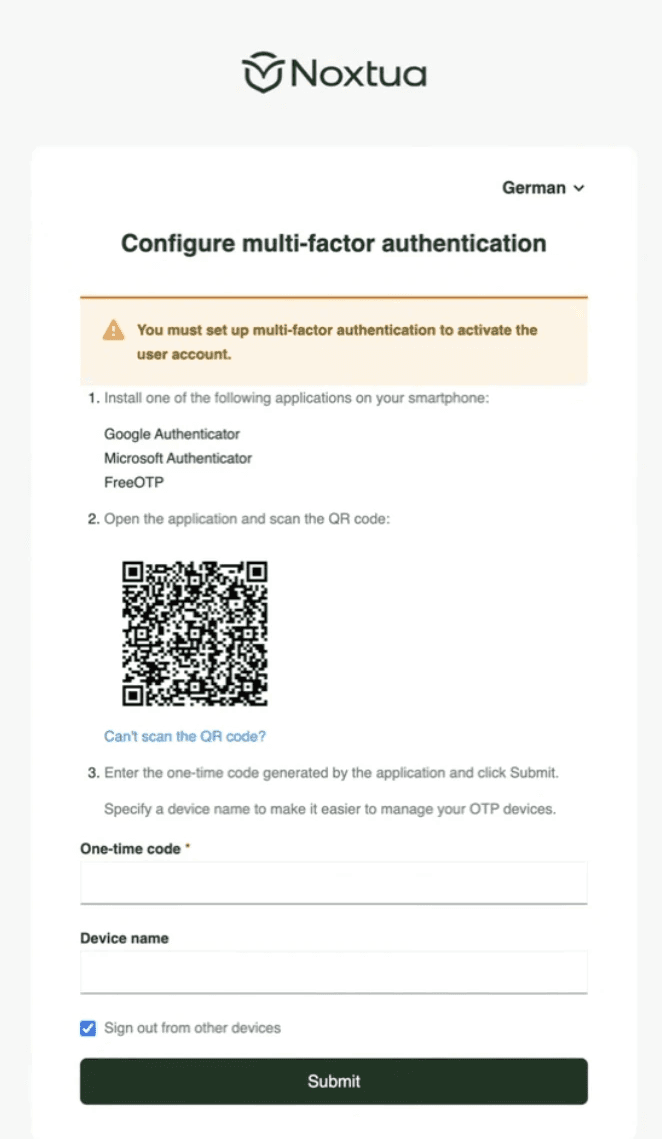
Install an authenticator app on your smartphone (for example, Google Authenticator, Microsoft Authenticator, or FreeOTP).
Beck‑Noxtua will show a QR code that you scan with the app.
The app will then generate a one‑time code that you enter in Beck‑Noxtua.
Optionally, you can give the device a name, so your registered devices are easier to manage.
Click “Submit” to complete the setup.
From that moment on, your account is protected by 2FA. Going forward, you will sign in with your password plus the current code from your authenticator app.
What to do if you forget your password
If you don’t remember your password, use the “Forgot password” button on the sign‑in page. Enter the E-Mail address you registered with, and Noxtua will send a link to reset your password. After resetting, you can sign in with your new password plus the authenticator code.
Troubleshooting login issues
If you encounter issues while trying to log in, consider the following possible causes and resolutions:
Incorrect Code: Ensure that the date and time settings on your smartphone are correct. Time discrepancies can lead to synchronization issues, causing the authentication of codes to fail.
No access to Authenticator App: If you have lost your device or can no longer access the authenticator app, please reach out to Noxtua Support for assistance in recovering your account.
Browser Issues: If your login attempt is unsuccessful, try using a private browser window (such as Chrome Incognito or Edge InPrivate) to log in. Clear your browser cache and cookies, then attempt to sign in again.

Petra Zatkova